Dear students open your saved file on desktop and continue with your story writing.
Use the images, texts and clip Arts.
Sunday, May 24, 2015

Year 4 Disc Jockey (DJ).
Research and create a presentation on how to use Virtual DJ in play production.
1. Name the parts of virtual DJ.
2. Explain the function of each part.
3.What makes a good DJ?.
Click the link to open this website.
https://www.youtube.com/watch?v=s3U3E_oFfH4
1. Name the parts of virtual DJ.
2. Explain the function of each part.
3.What makes a good DJ?.
Click the link to open this website.
https://www.youtube.com/watch?v=s3U3E_oFfH4
Year 4 Stage Lighting.
Research and create a presentation on how to use Stage Lights in play production.
1. Name the parts of Stage Lights.
2. Explain the function of each part.
3.What makes a good stage light?
Click this link to open.
Basics of Stage Light. click on link to open.
https://www.youtube.com/watch?v=Qtz4tJoe-Qw
1. Name the parts of Stage Lights.
2. Explain the function of each part.
3.What makes a good stage light?
Click this link to open.
Basics of Stage Light. click on link to open.
https://www.youtube.com/watch?v=Qtz4tJoe-Qw
Year 4 Sound System Department.
Research and create a multimedia presentation on how to setup a Public Address System. (Sound System, Mics, and Mixers,). Use the website link and video below.
Research and create a presentation .
1. Name the parts of PA.
2. Explain the function of each part.
3.What makes a good PA?
Click this link to open the website.
http://www.vocalist.org.uk/equipment_advice.html
Research and create a presentation .
1. Name the parts of PA.
2. Explain the function of each part.
3.What makes a good PA?
Click this link to open the website.
http://www.vocalist.org.uk/equipment_advice.html
Tuesday, May 12, 2015
Year 4: THEATER PRODUCTION
In Theater Production Unit, you will explore the functions of the following departments and their roles in ensuring a quality drama or play production.
Task1: Use PowerPoint to come up with 5 quick stage lighting ideas.
use this link:
https://dramateachersnetwork.wordpress.com/2013/07/09/5-quick-stage-lighting-teaching-ideas/
Different Departments in Drama Production:



Task1: Use PowerPoint to come up with 5 quick stage lighting ideas.
use this link:
https://dramateachersnetwork.wordpress.com/2013/07/09/5-quick-stage-lighting-teaching-ideas/
Different Departments in Drama Production:
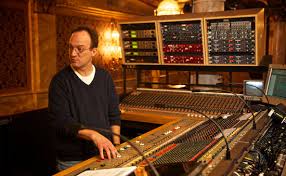
- Sound System department: Speakers, Mics, Mixers, Music.
- Lights department: Disco lights, spotlights, floodlights.
- Video production department.
- Photograph department.
Light

http://www.ssystems.co.za/uploads/images/sound%20systems%20Parcans%20-%20conventional%20lighting.jpg
Sound

http://theslanted.com/wp-content/uploads/2013/04/Sony-Home-Theater-2013-2.jpg
Mixer and Mics:
https://encrypted-tbn2.gstatic.com/images?q=tbn:ANd9GcROvO0Tcx0oUFgmsF8TAWUnjtRBnPcdG89QaN1sy6T2dFz7w6KZ
Photographer

http://img.burrard-lucas.com/i/meerkats.jpg
Monday, May 11, 2015
Year 3: ICT PORTFOLIO
Dear students as you go through the preparation of creating you ICT Portfolio, remember to write your reflection using some of the skills you have learnt.
- Researching skills/ Bibliography.
- Movie making skills: Movie maker and photostory 3
- PowerPoint: animations, transitions, music, video.
- Animation production: powtoon.
- Collaborative online sites: Padlet.com, http://padlet.com/Akamictjs/qt3m6yfntjh4
- Excel: totals, charts.
- upload videos/ projects on YouTube
- Downloading video and music using ilivid.com
- Internet safety
- Write a reflection at least a page in word and print two copies one to be filed in your class portfolio.

http://vividlife.me/ultimate/wp-content/uploads/2011/01/mirror-self-reflection-image.jpg
Year 4: ICT PORTFOLIO
Dear students as you go through the preparation of creating you ICT Portfolio, remember to write your reflection using some of the skills you have learnt.
- Researching skills/ Bibliography.
- Movie making skills: Movie maker and photostory 3
- website builders
- Animation production: powtoon.
- brochures
- Excel
- upload videos/ projects on YouTube
- Multimedia production: PowerPoint
- Go-animate
- Write a reflection at least a page in word and print two copies one to be filed in your class portfolio.
http://vividlife.me/ultimate/wp-content/uploads/2011/01/mirror-self-reflection-image.jpg
Wednesday, May 6, 2015
Year 3: Natural Hazards- Movie making.
Dear students you are supposed to create a movie on your three natural hazards you chose last week.
- create a folder on your flash disk or desk top.
- Search google images and save your images in the folder.
- plan your storyboard and import the images.
- Choose transitions between the slides/images
- Use credits to type the titles on , before or after the slide/image.
- Add music on the timeline.
- add bibliography at the end.
Here is Sonakshi's Grade 4 movie on Children's Rights.
Monday, May 4, 2015
Year 1: Sharing the Planet.
There are many resources/ things which are being wasted at home and even at school.

- which resources or things are being wasted at home?
- Which resources or things are being wasted at school?
Objectives:
- Create a poster to educate students and adults around you on one thing or resource being wasted. Example water, light, plants, food, fans, AC, .....

Sunday, May 3, 2015
Year 4 Market Places
Task: Website design/ Builder.
Objectives:
Objectives:
- On your personal or group website, add on the third page of the products, images and their prices.
- Provide a brief description on how useful those products are to the customers.
- List the websites where you got the images.
_ This is due today during ICT time.
Subscribe to:
Posts (Atom)